

 ウイルスチェック
iPhoneでアプリをダウンロードするには、このQRコードをスキャンしてください。

iPhoneにアプリを正しくインストールする方法は?
アプリのプライバシー
プライバシーの取り組みは、年齢、関与する機能、その他の要因に応じて異なる場合があります。 詳細はこちら
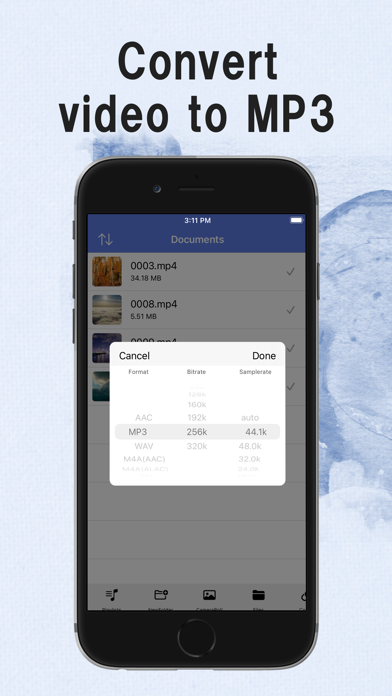
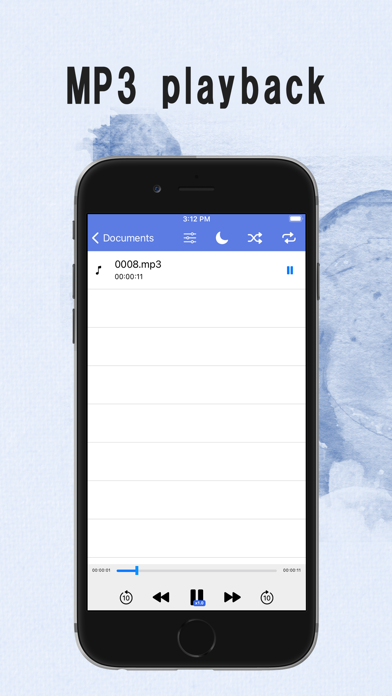
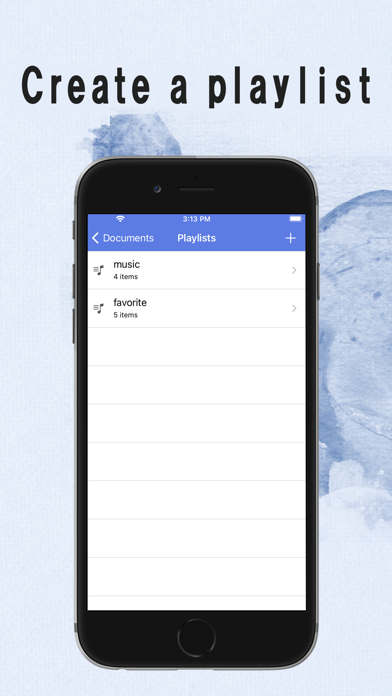
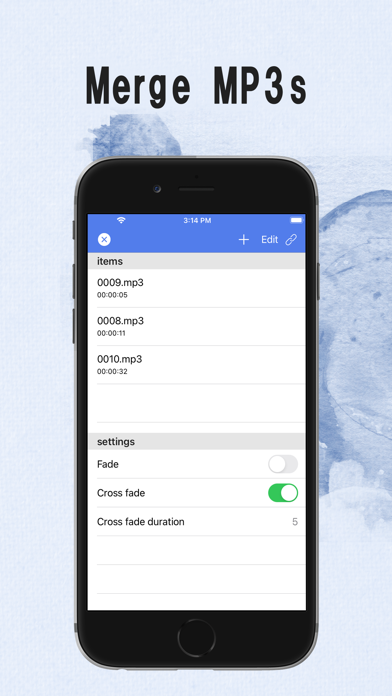
You can extract mp3s from video files and edit the extracted audio files. Simple yet high-speed operation for video sound source and audio conversion ■ Main functions - Extracting and converting audio from video files - Reconversion of audio files - Send audio files to other apps - Receiving audio / video files from other apps - Play music / audio files - Background playback - Control with genuine earphones - Edit ID3 tags for MP3s - File sharing using iTunes - Sleep timer supports music playback before bedtime - Editing and concatenating audio files - Sound quality correction with equalizer ■ Bit rate and sample rate during audio conversion Bit rate and sample rate can be set when converting to audio. - Select the bit rate from the following 16k 32k 64k 128k 160k 192k 256k 320k auto - Select the sample rate from the following 44.1k 48.0k 32.0k 24.0k 16.0k auto Recommended is "auto" for both bit rate and sample rate ■ List of supported formats for video and audio files Conversion source Video / audio file compatible format mp4 / mov / m4v / wmv / avi / flv / webm / mkv / mpeg / mpg / ogv / ts / 3gp aac / mp3 / wav / wma / flac / m4r Conversion destination audio file aac / mp3 / wav / m4a (aac) / m4a (alac) / caf / aiff ■ File format that can be played with the in-app audio player aac / mp3 / wav / m4a / aiff / caf Audio player supports background playback You can also play / stop using genuine earphones ■ Re-conversion of audio files It is also possible to reconvert the music files extracted from the video to another format. ■ Editing audio files - Cut out a part of the audio file - Change to stereo monaural - Bitrate change - Change sample rate - Change playback speed - Volume change - Equalizer ■ Concatenation of audio files - Multiple audio files can be concatenated ■ Playing audio files You can play the audio file in the app - Background playback - Equalizer - Playlist playback - Control with genuine earphones - Random playback - sleep mode The extensions supported for playback are as follows - mp3 - aac - alac - aiff - m4a - wav ■ Creating playlists You can create playlists with in-app audio files - Create playlist - Edit playlist - Playlist playback ■ Editing ID3 tags ID3tag can be edited for mp3 and m4a The items that can be edited are as follows - Album art - Album name - title - Ardist ■ Access from the file app Files saved in the app can also be accessed from the file app In this iPhone → Saved in EasyMP3 ■ Notes on use - The user is responsible for preparing the video including the sound source that will be the conversion source. This app does not have a video download function - Although audio extraction is performed from the video, it is not possible to extract only vocals or non-vocal audio. - Conversion can be performed only with iPhone / iPad, but the conversion time depends on the file size, playback time, and device performance of the conversion source video. - Although it is a so-called mp3 converter app, it also supports formats other than mp3. - Some functions require in-app purchase, but all basic functions can be used free of charge. We accept bug reports and suggestions for improving functions from users in reviews. We are accepting user opinions and impressions such as "I like this place" and "I want such a function", so please write a review.
8.0.1
03/09/2025
Performance improvements
8.0.0
01/04/2025
Changed the method of getting videos from the camera roll
| アプリ名: | EasyMp3 Video to mp3 Converter |
| 現在のバージョン: | 8.0.1 |
| アプリのリリース: | 09-30-2018 |
| パッケージ名: | net.webdia.EasyConverter |
| レビュー: | 2023 |
| 評価: | 4.8 |
| 価格(アプリ内購入): | 無料 |
| 開発者: | WEBDIA INC. |
| 開発者のウェブサイト: | https://easymp3.webdia.net/ |
| カテゴリー: | Music,Utilities |
| 利用可能な言語: | AR, DA, NL, EN, FI, FR, DE, HI, HU, ID, IT, JA, KO, MS, NB, PT, RU, ZH, ES, SV, TH, ZH, TR, VI |
| 対応デバイス: | iPhone5s-iPhone5s, iPadAir-iPadAir, iPadAirCellular-iPadAirCellular, iPadMiniRetina-iPadMiniRetina, iPadMiniRetinaCellular-iPadMiniRetinaCellular, iPhone6-iPhone6, iPhone6Plus-iPhone6Plus, iPadAir2-iPadAir2, iPadAir2Cellular-iPadAir2Cellular, iPadMini3-iPadMini3, iPadMini3Cellular-iPadMini3Cellular, iPodTouchSixthGen-iPodTouchSixthGen, iPhone6s-iPhone6s, iPhone6sPlus-iPhone6sPlus, iPadMini4-iPadMini4, iPadMini4Cellular-iPadMini4Cellular, iPadPro-iPadPro, iPadProCellular-iPadProCellular, iPadPro97-iPadPro97, iPadPro97Cellular-iPadPro97Cellular, iPhoneSE-iPhoneSE, iPhone7-iPhone7, iPhone7Plus-iPhone7Plus, iPad611-iPad611, iPad612-iPad612, iPad71-iPad71, iPad72-iPad72, iPad73-iPad73, iPad74-iPad74, iPhone8-iPhone8, iPhone8Plus-iPhone8Plus, iPhoneX-iPhoneX, iPad75-iPad75, iPad76-iPad76, iPhoneXS-iPhoneXS, iPhoneXSMax-iPhoneXSMax, iPhoneXR-iPhoneXR, iPad812-iPad812, iPad834-iPad834, iPad856-iPad856, iPad878-iPad878, iPadMini5-iPadMini5, iPadMini5Cellular-iPadMini5Cellular, iPadAir3-iPadAir3, iPadAir3Cellular-iPadAir3Cellular, iPodTouchSeventhGen-iPodTouchSeventhGen, iPhone11-iPhone11, iPhone11Pro-iPhone11Pro, iPadSeventhGen-iPadSeventhGen, iPadSeventhGenCellular-iPadSeventhGenCellular, iPhone11ProMax-iPhone11ProMax, iPhoneSESecondGen-iPhoneSESecondGen, iPadProSecondGen-iPadProSecondGen, iPadProSecondGenCellular-iPadProSecondGenCellular, iPadProFourthGen-iPadProFourthGen, iPadProFourthGenCellular-iPadProFourthGenCellular, iPhone12Mini-iPhone12Mini, iPhone12-iPhone12, iPhone12Pro-iPhone12Pro, iPhone12ProMax-iPhone12ProMax, iPadAir4-iPadAir4, iPadAir4Cellular-iPadAir4Cellular, iPadEighthGen-iPadEighthGen, iPadEighthGenCellular-iPadEighthGenCellular, iPadProThirdGen-iPadProThirdGen, iPadProThirdGenCellular-iPadProThirdGenCellular, iPadProFifthGen-iPadProFifthGen, iPadProFifthGenCellular-iPadProFifthGenCellular, iPhone13Pro-iPhone13Pro, iPhone13ProMax-iPhone13ProMax, iPhone13Mini-iPhone13Mini, iPhone13-iPhone13, iPadMiniSixthGen-iPadMiniSixthGen, iPadMiniSixthGenCellular-iPadMiniSixthGenCellular, iPadNinthGen-iPadNinthGen, iPadNinthGenCellular-iPadNinthGenCellular, iPhoneSEThirdGen-iPhoneSEThirdGen, iPadAirFifthGen-iPadAirFifthGen, iPadAirFifthGenCellular-iPadAirFifthGenCellular, iPhone14-iPhone14, iPhone14Plus-iPhone14Plus, iPhone14Pro-iPhone14Pro, iPhone14ProMax-iPhone14ProMax, iPadTenthGen-iPadTenthGen, iPadTenthGenCellular-iPadTenthGenCellular, iPadPro11FourthGen-iPadPro11FourthGen, iPadPro11FourthGenCellular-iPadPro11FourthGenCellular, iPadProSixthGen-iPadProSixthGen, iPadProSixthGenCellular-iPadProSixthGenCellular, iPhone15-iPhone15, iPhone15Plus-iPhone15Plus, iPhone15Pro-iPhone15Pro, iPhone15ProMax-iPhone15ProMax, iPadAir11M2-iPadAir11M2, iPadAir11M2Cellular-iPadAir11M2Cellular, iPadAir13M2-iPadAir13M2, iPadAir13M2Cellular-iPadAir13M2Cellular, iPadPro11M4-iPadPro11M4, iPadPro11M4Cellular-iPadPro11M4Cellular, iPadPro13M4-iPadPro13M4, iPadPro13M4Cellular-iPadPro13M4Cellular, iPhone16-iPhone16, iPhone16Plus-iPhone16Plus, iPhone16Pro-iPhone16Pro, iPhone16ProMax-iPhone16ProMax, iPadMiniA17Pro-iPadMiniA17Pro, iPadMiniA17ProCellular-iPadMiniA17ProCellular, iPhone16e-iPhone16e, iPadA16-iPadA16, iPadA16Cellular-iPadA16Cellular, iPadAir11M3-iPadAir11M3, iPadAir11M3Cellular-iPadAir11M3Cellular, iPadAir13M3-iPadAir13M3, iPadAir13M3Cellular-iPadAir13M3Cellular |
| Media Converter - video to mp3 | MP3 Converter -Audio Extractor | EasyMp3 Video to mp3 Converter | |
|---|---|---|---|
| 更新日 | 9月 03, 2025 | 9月 13, 2025 | 9月 03, 2025 |
| 現在のバージョン | 4.11 | 6.9 | 8.0.1 |
| 評価 |
|
|
|
| 動画ダウンロード | ビデオ MP3 コンバーター | Video MP3 Converter | Audio Converter - MP4 to MP3 | ビデオをMP3に変換する | MP3動画変換 | X ダウンローダー & ビデオ プレーヤー | |
|---|---|---|---|---|---|---|---|
| 更新日 | 4月 07, 2026 | 3月 30, 2026 | 1月 09, 2026 | 9月 22, 2025 | 3月 26, 2026 | 10月 30, 2025 | 3月 23, 2026 |
| 現在のバージョン | 2.5.8 | 2.9.113 | 2.7.2 | 1.2.24 | v1.1.24 | 2.2.3 | 2.3.14 |
| スコア |
|
|
|
|
|
|
|
無料ツール
動画をHD品質のMP4としてダウンロード。
Compare Video to MP3 Converters. Thumbnail Preview. Video Charts
Copyright © 2026 All Right Reserved. Privacy Policy